
Google Search Console vs Google Analytics: What's the Difference
Apr 30, 2026Google Search Console vs Google Analytics: What's the Difference (and Why You Need Both)
Someone told you to set up Google Search Console, Google Analytics, and a Google Business Profile. So you did. You clicked through the setup, linked the accounts when it asked you to, and then closed the tab and never went back. (It happens to the best of us.)
Sound familiar? We see this all the time with coaches, consultants, and service providers. The tools are set up. They are technically "working." But if you have never actually logged in and looked around, you are leaving some of the most valuable business intelligence you have just sitting there untouched.
This post is going to change that. (WooHoo!) We are going to break down what each tool actually does, why they are not the same thing (a question we get asked a lot), and what you should actually be checking on a regular basis to make smarter decisions in your business.
Is Google Search Console the Same as Google Analytics?
No. They are two completely different tools that answer two completely different questions. The fact that Google makes you link them together does not mean they are the same thing. It means they are better together, and we will get to that in a minute.
Here is a simplest way to think about it:
Google Search Console tells you what happens before someone clicks on your website. It shows you what people searched for, how often your site showed up in results, and how many people actually clicked through to your page. Think of it as the view from outside your front door.
Google Analytics tells you what happens after someone lands on your website. It shows you which pages they visited, how long they stayed, where they came from, and whether they took any action. Think of it as the view from inside your house.
You need both because one without the other only tells you half the story.
Here is what that looks like in practice. If Search Console shows you that people are finding your website by searching a specific topic, that tells you exactly what your audience wants more of and gives you a content roadmap. If Analytics shows you that one particular page on your site gets significantly more traffic than the others, that is your cue to go in, make sure that page is fully optimized, and give visitors a clear next step once they land there. These micro changes are what move the needle on conversions and revenue over time.
What Does Google Search Console Show You?
When you log into Google Search Console, the most important section to look at is called Performance. This report shows you every search query your website appeared for, how many times it showed up (called impressions), how many people clicked, and your average position in the results.
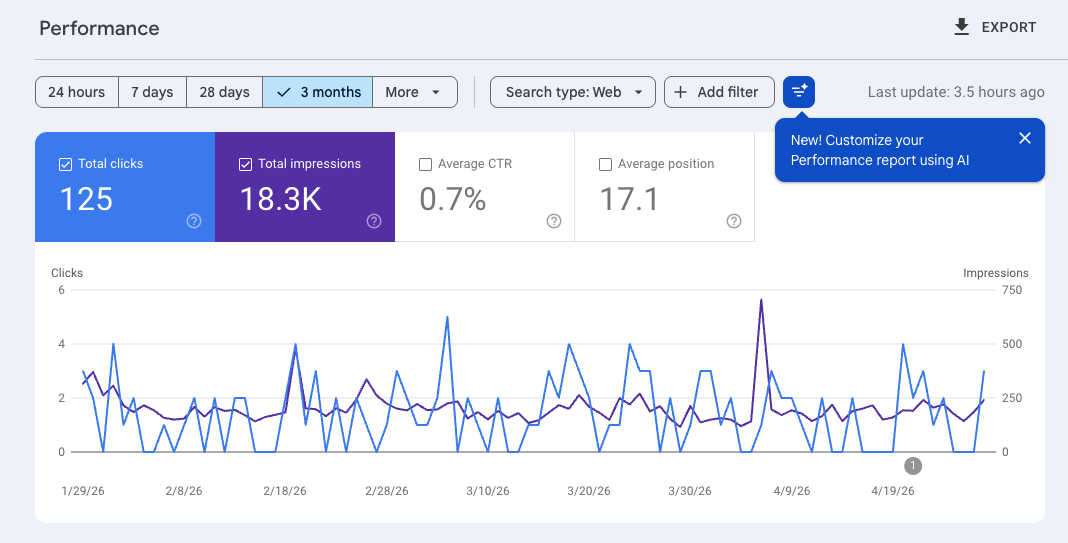
This is data you literally cannot get anywhere else. Google stopped sharing keyword data with other tools years ago, which means Search Console is the only place where you can see what people are actually typing into Google before they find YOU.
Look under "Queries" to see what people are searching for when they find you.
Why does this matter? Because it tells you whether the content you are creating is connecting with the people you want to reach. You might publish a blog post thinking it is about one thing, and Search Console shows you people are finding it through a completely different search. That is information you can use to create more content, update existing pages, and stop guessing about what your audience actually wants and finally know what they want.
Search Console also flags technical issues, like pages that are not indexed (meaning Google cannot find them and they will not show up in search results at all). If a page is not indexed, it is essentially invisible. This report catches those problems early.
A healthy website is one where the pages that matter most are indexed, showing up in search, and getting clicked. Search Console is how you know whether that is actually happening.
What Does Google Analytics Tell You That Your Other Tools Can't?
The question we hear most often is: "I already have analytics inside Kajabi (or my website platform), and my CRM shows me my email stats. Why do I need Google Analytics on top of that?"
A totally fair question and one you should ask because the answer gives you all kinda of juicy insight.
Your website platform shows you page-level data in isolation. You can see that your sales page got 400 views and 15 people bought, but it cannot tell you where those 400 people came from, what they looked at before they got there, or what made the 15 who bought different from the 385 who did not.
Your CRM or email platform shows you what your existing subscribers did. Open rates, click rates, who visited a specific page from a specific email. But it only sees the people already on your list. It has no visibility into the strangers finding you through search, social, or referrals.
Google Analytics sits above all of it and watches your entire website as one connected experience. (Think Big Brother, *wink*) It tracks the full journey: where someone came from, every page they visited in order, and whether they eventually converted. It connects the dots that your other platforms cannot see because each of them only owns one piece of the puzzle.
One of the most powerful things Analytics can show you is your traffic sources. Let's say you are posting on Instagram, TikTok, YouTube, Pinterest, and writing blog posts, and you discover that 80% of your traffic is coming from your blog and YouTube while the other three platforms are barely registering. You can now use this information to analyze why or if you should continue stretching yourself thin trying to show up everywhere, instead you can double down on what is actually working and let the rest go. (sigh of relief anyone?)
Keep in mind, the data only tells you what is happening, not always why. If you are posting on YouTube three times a week and showing up on Instagram twice a month, of course YouTube is going to win. That does not automatically mean you should ditch Instagram. It means you need to look at the effort behind the numbers before you make any big decisions. When you are showing up consistently across platforms, that is when the comparison actually gets useful and you can make a strategic call about where to focus your energy going forward.`
The businesses that grow strategically are not working harder across more platforms. They are working smarter on fewer platforms because they know where their audience actually comes from.
What Are Conversions in Google Analytics?
This is where Analytics starts to feel less like a traffic report and more like a business intelligence tool.
Inside Google Analytics (specifically GA4, which is the current version), you can set up what are called Conversions. A conversion is any action that matters to your business: someone landing on your thank you page after booking a discovery call, a purchase being completed, someone downloading your freebie. You tell Analytics what counts as a win, and it tracks how often that win happens and where it came from.
Once conversions are set up, you can see where in your funnel people are dropping off before completing the action. Maybe 200 people land on your sales page, 80 scroll halfway through, and only 12 make it to checkout. That drop-off data tells you exactly where the friction is and where to focus your energy to improve results.
This is the difference between knowing your sales page got traffic and knowing your sales page is actually working. They are not the same thing.
We recently set this up for a client, and what they discovered is that a lot more people were finding their website than they ever realized. They had been so focused on their email list and social media that they had no idea organic search was quietly sending people to their site every single day. Once they saw that, they got excited. It motivated them to make sure their website was fully optimized and to keep creating content consistently, because now they could actually see it was working. That kind of data doesn't just inform your decisions. It can inspire you to learn into the momentum!
Why Should You Link Google Search Console and Google Analytics?
Remember when the setup process asked you to link these two tools? Here is why that matters.
Search Console shows you what people searched before they clicked. Analytics shows you what those people did after they landed. On their own, each tool answers half the question. Linked together, you can see the full picture in one place: this keyword brought 300 people to my site, and here is what those 300 people actually did when they got there.
That connection is what allows you to answer the question every business owner should be asking: "Which of my content is not just getting found, but actually converting?" A blog post can rank on page one of Google and still bring in the wrong audience. Linked data helps you see and understand the difference.
Setting up the link takes about five minutes inside GA4's admin settings, and it is one of the most valuable five minutes you will spend in your analytics setup. If you have not set these up already, it does prompt you to link them together in your set up process.
What to Actually Check Once a Month
Not set up yet? Start here first.
If you still need to get your Google Analytics 4 (GA4) connected, we have step by step tutorial videos. Get set up, then come back and use this routine below.
- Google Analytics setup tutorial - Start here for any platform
- How to connect Google Analytics on Kajabi
- How to connect Google Analytics on AttractWell
- How to connect Google Analytics on GetOiling
You do not need to live inside these tools. A once-a-month check-in is enough to stay informed and make smart decisions. Here is a simple routine to follow:
Google Search Console: Open the Performance report and look at your top queries. Are the keywords you are ranking for actually relevant to what you sell? Look for pages sitting in positions 5 through 15 in the results. Those are close to page one and worth updating or promoting to push them higher. Also do a quick check of the Coverage report to make sure no important pages have dropped out of the index.
Google Analytics: Check your traffic sources to see where your visitors are coming from. Look at which pages are getting the most engagement. If you have conversions set up, check how many happened and which traffic source drove them. Look for anything that changed significantly from the previous month and ask yourself why.
All it takes is these two tools and 30 minutes a month! The solopreneurs who do this consistently make better content decisions, invest their marketing energy in the right places, and stop throwing effort at strategies that are not producing results. (KEY for eliminating burnout and increasing ROI.)
You Do Not Have to Figure This Out Alone
Setting up these tools correctly from the start makes everything downstream easier. If your accounts are not linked, your conversions are not tracked, or your Business Profile is incomplete, the data you are looking at is incomplete too.
At K+C creative, we offer SEO setup as an add-on to our website packages. As part of the SEO/AEO Package, make sure all three tools are properly configured, linked, and set up to track what actually matters for your business so that when you log in, you are looking at data you can actually use.
If you are not sure whether your current setup is giving you the full picture, reach out and we will take a look together.
Read The AI Advantage Every Sunday Morning!
If you want to stay ahead of what's changing in AI, learn what tools are actually worth using, and get practical strategies you can apply to your business and marketing that same week, our free newsletter was made for you.