Working Faster, Feeling Frazzled (Yep, Both Can Be True)
THIS WEEK IN AI
About 20 minutes before sitting down to write this newsletter, one of us had to pull herself away from four other projects just to brain dump notes into a chat so she wouldn't lose her train of thought. (Hi! It's me, Krissy!)
That is kind of the whole article in a nutshell.
This week I got more done than I ever could have without AI, and but I also felt more scattered than I have in months. And once I started looking around, I realized a lot of you have been feeling the same thing.
So this week, we are diving into where AI is actually making us more productive (with research to back it up). Where it's creating brand-new traps we didn't see coming. And the one shift I made this week that completely changed how Claude works for me!
OPINION
ARE WE ACTUALLY DOING MORE WORK WITH AI?
We've been hearing this from a lot of business owners lately. They started using AI thinking it would save them time, and now they swear they're working harder than they were before.
We can definitly relate at times. So we did some digging.
I have realized when you're using AI to do a thing you have never set up a system for before (a client document, a process, a template, a workflow), it can absolutely take you longer the first time. We lived this earlier this year with our Website Strategy and Planning document, the deliverable we hand to clients after a strategy session.
We knew what we wanted it to feel like and do, but weren't exactly sure how to set it up. So we went back and forth with Claude for what felt like forever, hashing out the structure, deciding which sections were essential, figuring out where our judgement needed to live versus where AI could handle the heavy lift. It was slow. It was frustrating. We probably spent twice as long on that first version as we would have writing one client doc by hand.
Now, that document gets turned around in a fraction of the time, and every client gets a more thoughtful, more polished version of it than we could have produced manually under any kind of deadline. We used to say on our website that our turnaround time was three business days, but now we can confidently promise one, because AI takes everything we recommend during a strategy session and turns it into a well-polished, client-facing document almost right away.
We are gonna start calling this the setup tax. The first time you build something with AI, you pay must pay your taxes (bla). The good news is that after that, the savings start to compound.
I even found some resaarch to back this up! A Harvard Business School and Boston Consulting Group study found that knowledge workers using AI completed 12.2% more tasks, 25.1% faster, and produced 40% higher quality output. (Lower-skilled workers saw the biggest jump, by the way. Up to 43% more productivity. AI is really good at lifting people from "okay" to "really good" at things they have not been formally trained in.)
So yes. AI saves time and quite a bit of it. But not on day one (usually). On day one, you're paying the setup tax. The question we now ask ourselves before any new AI workflow is this: Is what I'm doing right now going to keep saving me time the next time I do this and the time after? In six months, how much time will I save? If yes and a lot are the answers then we will begrugingly pay the setup tax.
HOW TO USE IT
When AI starts doing the work for you, while you're on a coffee break
Quick personal moment from Krissy. (Hi again.) My old computer was so old that I could not run Cowork, the Anthropic tool that lets Claude actually go do things inside other software instead of just talking about them. For months I have been watching everyone else use it while I sat in my little Claude chat window like a kid pressing her face against the candy store glass.
Then the Mac Mini arrived. I have officially evolved.
I used Cowork twice this week, and it was the kind of good that makes you want to cancel meetings and play with it for the rest of the afternoon. But before I tell you about that, a quick word on how Claude can plug into the rest of your business, because Cowork is just one piece of a bigger picture.
There are actually two ways to get Claude working inside the tools you already use, and they go from "click a button" easy to "this is honestly a little wild" advanced.
Way 1: Connectors
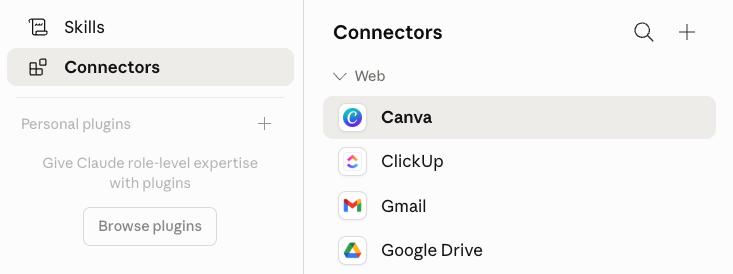
This is the easy button most people don't even know is sitting right there. In Claude, click your name in the bottom corner, then Customize, then Connectors. You'll see a whole list of tools Claude can already plug into directly — things like Gmail, Google Drive, ClickUp, Notion, Canva, HubSpot, and a bunch more being added all the time. Click the ones you use, follow the connect prompts, and that's it. Now you can ask Claude to look something up in your inbox or pull a doc out of your Drive without ever leaving the chat.
Don't see your tool on the list? Don't panic. (And don't text us asking why this isn't working.) There is another way, and it's right below.
Way 2: MCP
MCP stands for Model Context Protocol (Don't worry, people just say MCP so you don't have to remember that). In plain English, it's a more advanced version of what Connectors do. When Claude doesn't have a built-in connector for the tool you want, MCP is how you bring one in yourself.
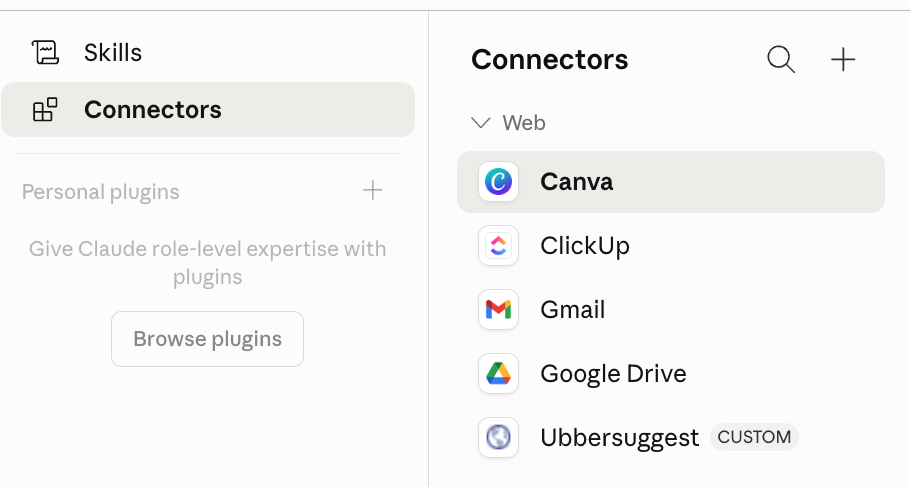
Picture this. You ask Claude to pull traffic data from Google Analytics, run a keyword search in Ubersuggest, or peek at your email subscriber list, all without you having to do anything but tell it to do so... The MCP allows you to connect a tool and do that!
We have it set up with Ubersuggest and a few other tools that aren't in the standard connectors list yet. (You can see it says CUSTOM by Ubbersuggest. That is how you know I used an MCP to connect it)
How to find an MCP for the tools you use: Open Google. Type "Does [your tool] have an MCP I can use with Claude?" (literally word-for-word, you do not need to be fancy about it). Copy the connection link, paste it into Claude's settings, follow the prompts, and you are connected.
Heads up though, Not every platform has a clean direct connection yet. We were just looking into Kajabi (our all in one platform) and it KINDA has an MCP. By kinda I mean it technically has one but it has limitations preventitng you from doing a lot of things you probably want to do, like put the email it just wrote you inside Kajabi and schedule it for you. (It can NOT do that) You can get there through Zapier and a few third-party tools, but no clean one-click connection (yet, we hope, please Kajabi). On the flip side, if you use Kit (formerly ConvertKit) for your email marketing, LUCKY... (Read that in our best Napoleon Dynamite voice) Kit has a great native MCP, which means you can basically have Claude run your email marketing for you.
The lesson is always Google before you assume, because what wasn't there yesterday might be there today.
The Magic of Cowork
This is where my Mac Mini became my bestie! Now that my tools (like Ubbersuggest) are set up, I can have Claude work FOR me!
Cowork lets Claude actually drive a browser the way a coworker would. Clicking buttons, filling in fields, navigating between tabs, the whole thing. (Yes, it is a little bit magical. Yes, we have a few opinions about whether this is a sign of progress or the opening scene of a horror movie we have already watched.)
I used it twice this week. The first time was for an SEO project. What would normally have been most of an afternoon (the kind that involves 14 tabs, a Google Doc, and a slowly cooling cup of mushroom chai) turned into about half an hour of supervised work. I watched Claude pull the data, build the analysis, and assemble the deliverable while I got other things done.
The second time was even better. We had a client whose sales page was originally promoting a live cohort, and she wanted to convert it into an evergreen offer. After we gave her our feedback, we used Cowork to apply our recommendations directly to the copy in the Google Doc.
While this seemed amazing I will say that 1/2 way through my very first cowork session it stoped and siad "you have run out of tockens" (or whatever it says when you can't do any more work without upgrading your plan): I had to bump up from teh $20 plac to the $100 Max plan and have not hit the wall since. Sooo, there is that. A $75-a-month jump can feel like a lot but if you really think about it. A VA at $30 to $40 an hour for three hours of work runs you about $90 to $120. The Max plan, doing more than three hours of actual output every month, runs you and extra $75. Seems totally worth it in one day!
Other AI platforms have been racing to roll out their own version of this kind of feature, so check and see if what you are using as a version. OpenAI's version is called Codex. Manus, another player going head to head with Anthropic and OpenAI, and their version is called My Computer. We have heard nothing but good things about Manus but have not gotten our hands on it ourselves yet.
REAL TALK
THE 30-SECOND WINDOW THAT BROKE OUR BRAINS
Okay, here is where I have to be super honest.
While AI is speading most things up, it's also making me feel a little more scattared at times.
Let's break it down. You ask Claude to draft something. It takes 60 to 90 seconds. That window is too short to feel like a real break, but somehow too long to just sit there and wait (which is sad that we can't wiat a minuted and a half for something anymore!) You get impatient so you open another tab or another chat and start a new thing. You pop back to check the draft, edit it, send a reply, swing back to the second thing, then a third idea hits you and you open a new chat, and suddenly your brain is flipping between five projects every 2 min and internaly you are getting a little over stimulated.
This kind of thing did not used to happen to us, because there was no waiting window built into our workday before AI showed up. Now there is, and the result is that our brains end up looking a whole lot like that silver ball in a pinball machine, ricocheting from tab to tab to idea to notification to client email and back again, racking up points for absolutely no one and occasionally getting flung straight off the table.
The research on what context-switching does to your brain is, to put it gently, not a fun read. Gloria Mark at UC Irvine has been studying workplace interruption for over twenty years. Her finding: it takes an average of 23 minutes and 15 seconds to fully refocus on a task after an interruption. As she puts it, we don't have work days anymore. We have work minutes that last all day.
Multitasking also activates the same stress system that fires up when something dangerous happens, like, say, being chased by a bear. Your brain releases cortisol. Your prefrontal cortex (the part actually doing your thinking) starts handing resources back to the part of your brain looking out for threats, because as far as your nervous system is concerned, the threat might be a bear. (It is a Slack ping. It is always a Slack ping.) You feel wired and foggy and a little bit fried.
If you happen to be a little neurosensitive (like moi), this might hit closer to home. There's research showing that some of us have a more reactive HPA axis, which is just a fancy way of saying the system that releases cortisol fires faster in some people than others, especially folks with ADHD. A workday full of context-switches takes a bigger nervous-system toll on some of us than others, and we should probably stop pretending it doesn't.
And get this! A brand new study from Boston Consulting Group (March of this year) found that workers using a lot of AI oversight in their day are reporting more brain fog, more decision fatigue, more errors, and a higher intent to quit their jobs. Hold on. We have been talking for two years about whether AI was going to replace people's jobs, and now we have research saying AI might be making people want to quit their jobs because of how it makes them feel? Holy cow. That is a plot twist nobody saw coming.
We have certainly felt some kind of version of this. There was a moment in our team meeting this week where the three of us sat in actual silence for a full minute trying to remember what the source list at the back of a paper is called. (It's a bibliography. We got there eventually.) Maybe it is AI making us a little dumber. Or maybe it is the fact that none of us has had to write a paper since the eighth grade, which for some of us was over 20 years ago. Either way, it does not exactly fill us with confidence about what our brains are doing in there.
We don't think the answer is to use less AI. We think the answer is to use it more thoughtfully. Which brings us to our favorite part of this newsletter.
YOU CAN TRY THIS TOO
Three things we are testing this week that have already made a difference:
1. The /clear tip for Claude Code (and any long Claude session).
Have you ever gotten stuck in the loop? You ask Claude to fix something. It fixes it, kind of, but in the wrong way. You ask it to fix the fix. It does, but breaks something else. You ask it again, and then again, and now you are 12 messages in and Claude is somehow suggesting the exact bad solution it tried six messages ago. You're stuck in the loop.
Claude can see every failed attempt sitting up in the conversation, and it keeps drifting back toward those approaches because they're in its line of sight. (This is documented behavior, by the way. Anthropic actually recommends this fix in their own Claude Code docs.) The solution is delightfully simple: type /clear, start a fresh chat, and write a new prompt that includes whatever you just learned from the failed attempts. This will prevent inapproproaite cursing at your AI.
2. Batch the same kind of work.
This was a productivity hack we used long before AI showed up, and it turns out it is just as effective now that AI is in the mix. While AI can hop between completely different kinds of work without breaking a sweat, your brain absolutely cannot. So if you offer a service you do for multiple clients, or for yourself, batch your work by service, not by client. SEO for three clients in a row will leave you sharp. SEO for one client, then email copy for another, then a brand new offer for a third will leave you fried.
3. Park your stray thoughts in a chat. Don't open a new tab to start a new task.
When something pops into your head while you are in the middle of working on something else, here my move (feel free to steal it). Open a new chat, use wisper flo to speak out your thought (it's faster than typing) Then add a line that says: "I don't want to work on this right now. Hold onto it and we'll come back to it later." Then go back to what you were doing. I do this constantly in a social media project I have whenever I get a brilliant (and hopfully viral) idea
And our favorite exercise of the week: Make a list of every single thing you would hand to an executive assistant if you had one. The whole list. Then go ask Claude (or whatever AI tool you use) which items on that list it could already help you with. The answer is usually surprising. Some of those tasks become instant time-savers. Others reveal that AI is now the executive assistant you weren't sure you could afford.
(Our paid AI CLUB members get the full structured prompt for this exercise in this week's bonus section, by the way. Plus a Cowork hack for anyone juggling a Claude Team plan that we promise you have not seen anywhere else.)
THE TAKEAWAY
Here is what this week taught us.
AI is not magic. It is leverage. And like any leverage, it can either lift the load you are carrying or pile new things on top of the load you were already carrying. The difference is intention.
So before you open your AI tools this week, ask yourself two questions:
What is this saving me time on six months from now? (If the answer is nothing, move on.)
What would I want a really good assistant to be doing for me right now? (Then go check whether AI can already do it.)
If you aren't seeing the BONUS prompts below, that means you are not officially subscribed to this newsletter. Dro your email in and we'll release the rest!